Turtalls- og referansesensor – kontroll, bytte og justering
Informasjon, motstandsverdier, funksjonskontroll, byttprosedyre og klaringsjustering for veivakselens turtallssensor og referansesensor i 944-ens motorstyringssystem.
Innledning
944-ens motorstyringssystem bruker to veivakselsensorer:
- Referansesensor: Bestemmer posisjonen til sylinder nummer 1 (foran på motoren) i forhold til øvre dødpunkt (ØD) på kompresjonsslaget.
- Turtallssensor: Teller tennene på svinghjulet og sender turtallsinformasjon til DME-datamaskinen som en serie pulser.
DME-en bruker begge signalene sammen for å bestemme motorens posisjon på ethvert punkt i syklusen, slik at drivstoffinnsprøytingen og tenningen utløses til riktig tid. Turtallssensorens signal fungerer også som en sikkerhetsfunksjon – etter at den første oppstartskremmingen er fullført, stenger DME-en av drivstoffpumpen hvis motorturtallet faller under 300 o/min.
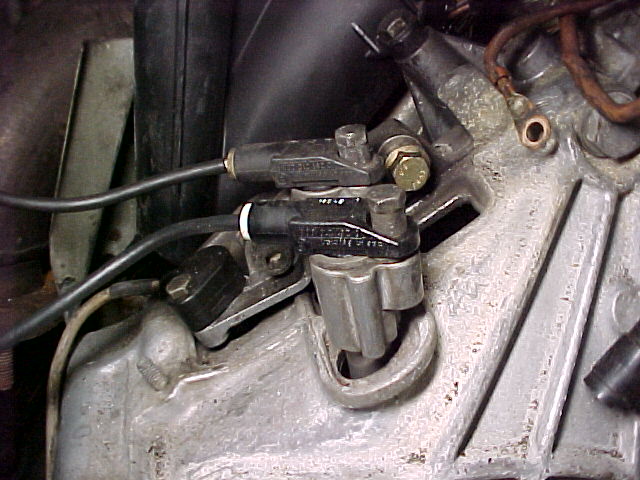
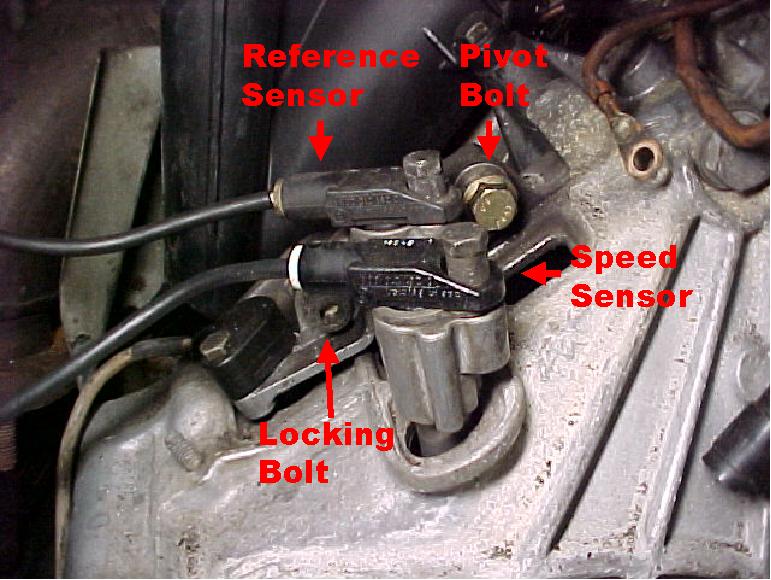
Begge sensorene sitter oppå clutchhuset bak på motoren, synlige fra førersiden nær brannveggen.
Verktøy
- 10 mm pipe eller 5 mm umbrakopipe (avhengig av type festebolt for sensoren)
- 6 mm umbrakopipe
- 0,8 mm tykk skive (for klaringsjustering av sensoren)
- Multimeter
- Oscilloskop (valgfritt, for funksjonskontroll av signalet)
Kontroll av sensorfunksjon
Motstandsmålinger
- Koble fra sensorpluggens kontakt bak i motorrommet.
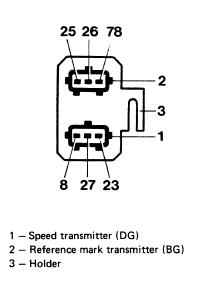
- Mål sensormotstandene med et multimeter:
| Terminaler | Spesifikasjon |
|---|---|
| 8 – 27 | 600–1 600 ohm |
| 8 – 23 | > 1 Mohm |
| Terminaler | Spesifikasjon |
|---|---|
| 25 – 26 | 600–1 600 ohm |
| 25 – 78 | > 1 Mohm |
Funksjonskontroll av signalet
En oscilloskoptest bekrefter om sensorene leverer brukbare signaler til DME-en. Et multimeter kan påvise om det finnes et signal, men kan ikke bekrefte styrken, så det avslører ikke om signalet er sterkt nok til at DME-en kan lese det.
- Ta ut drivstoffpumpesikringen.
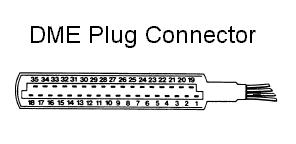
- Koble fra DME-datamaskinens plugg.
- Slik kontrollerer du turtallssensoren: koble et oscilloskop til terminalene 8–27 på DME-pluggen. Tørn motoren rundt og se etter en sagtannbølge med en topp-til-topp-spenning over 2,5 V.
- Slik kontrollerer du referansesensoren: koble et oscilloskop til terminalene 25–26 på DME-pluggen. Tørn motoren rundt og se etter periodiske pulser med en topp-til-topp-spenning over 2,0 V.
- Hvis en av spenningene er under spesifikasjonen, kontroller sensorklaringen etter avsnittet «Justering av sensorklaring» nedenfor.
Merk: En rask kontroll uten oscilloskop: tørn motoren rundt og følg med på turtelleren. Hopper turtellernålen under tørning, fungerer turtalls- og referansesensoren sannsynligvis. Beveger den seg ikke, kan feilen ligge i sensorene eller i DME-en.
Demontering av sensor
- Koble fra batteriets minusledning.
- Koble fra kontaktene til turtalls- og/eller referansesensoren bak på innsugsmanifolden.
- Fjern sensorens festebolt (5 mm umbrakopipe eller 10 mm pipe, avhengig av bolttype).
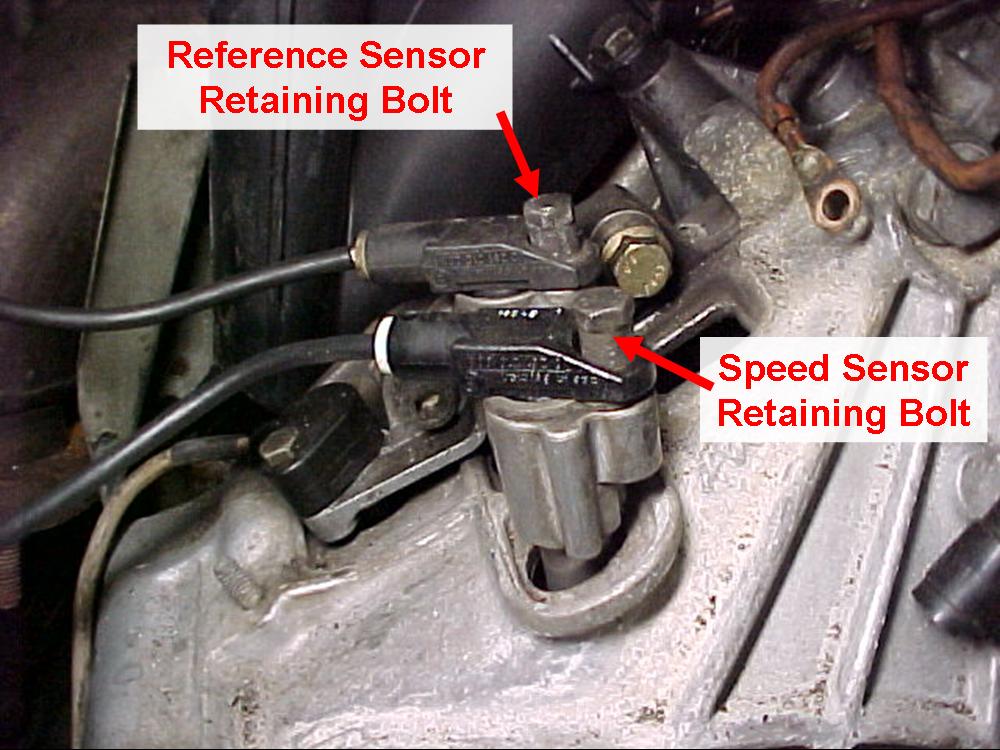
- Vri sensoren fra side til side mens du trekker oppover for å løsne den fra festebraketten.
Montering av sensor
-
Hvis begge sensorene skal byttes, kontroller riktig montering ved hjelp av merkingen på kabelstammen og på festebraketten:
Merking på kabelstammen:
- DG = turtallssensor
- BG = referansesensor
Merking på festebraketten:
- D = turtallssensor
- B = referansesensor
Hvis merkingen på festebraketten er uleselig, er sensoren nærmest brannveggen turtallssensoren.
Tips: Hvis merkingen på kabelstammen mangler og kontaktene er tatt av braketten – slik at du ikke kan se hvilken kontakt på kabelstammen som hører til hvilken sensor – mål motstanden med et ohmmeter fra DME-pluggkontakten til hver sensorkontakt, og bruk terminalparene fra motstandstabellene over (turtallssensor 8–27, referansesensor 25–26) for å finne ut hvilken kontakt som hører til hvilken sensor.
-
Hvis sensorens festebrakett har blitt flyttet, eller du er usikker på innrettingen, utfør prosedyren «Justering av sensorklaring» nedenfor.
-
Monter sensorene og festeboltene. Stram festeboltene til 8 N·m6 ft·lb.
-
Koble til batteriets minusledning igjen.
Justering av sensorklaring
Justering av sensorklaring trengs bare hvis sensorens festebrakett er demontert, eller hvis brakettens låsebolt utilsiktet er løsnet. Nye sensorer trenger normalt ingen justering.
- Demonter turtallssensoren.
- Løsne brakettens låsebolt (6 mm umbrako) og svingbolten; stram begge fingerstramt igjen.
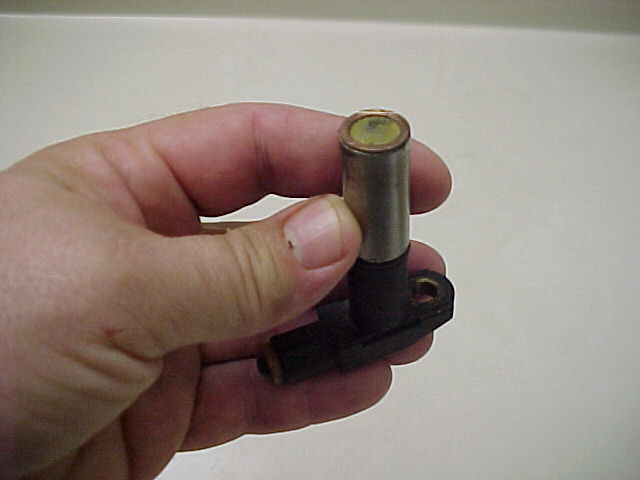
- Lim en 0,8 mm tykk skive på undersiden av turtallssensoren.
Tips: Å ha en egen sensor til klaringsjustering sparer gjentakelse av dette steget — en gammel turtallssensor med den elektriske ledningen kappet av og 0,8 mm-skiven permanent limt på tuppen kan gjenbrukes ved hver klaringsjustering.
- Monter sensoren med skiven påsatt og stram.
- Beveg braketten nedover til den stopper mot tannkransen på svinghjulet.
- Stram brakettens låsebolt og svingbolten.
- Demonter sensoren med skiven.
- Hvis sensoren skal gjenbrukes, lirk skiven av.
- Monter sensoren og stram festebolten til 8 N·m6 ft·lb.
- Koble til batteriets minusledning igjen.